PICO-8 Devlog 3: Vibe
I just posted my last devlog, and I've already made enough progress to warrant another. It's amazing what you can get done when you have a weekend to yourself.
Objective
There are two strands to this project:
- A core game mechanic that's simple & intuitive
- Cool aesthetics to make it inherently exciting
I'm happy with my progress on the mechanics, so I want to get into the presentational side for a while and prove to myself that I can also implement features to support the vibe I'm going for.
Lazy Devs Academy's breakout tutorial quotes 2D Boy (?) on this, but I can't find the source he's reading from. It describes "juice" as
"[…]constant and bountiful user feedback. A juicy game element will bounce and wiggle and squirt and make a little noise when you touch it. A juicy game feels alive."
So this is exactly what I'm about. I want it to look and feel exciting, even if the gameplay itself is quite limited. I want to pull the player in and sort of trick them into playing something that looks better than it is! 😄
The defining features in my vision for the game are:
- Ravey, synthwave color combinations
- A good sense of weight and movement
- Flashy, exaggerated special effects
- Music & SFX that to accompany these
This isn't just a little treat for me; I assume there's a dialogue between the effects and the gameplay that informs each, and that the code needs to be structured to accommodate both aspects. So I'm following my nose a little, but that's OK, it's a voyage of discovery.
Process
Each idea I wanted to explore has a value:difficulty ratio in my mind. These didn't always turn out to be correct, but I prioritised them by my perceived bang-for-buck.
Screenshake
I knew that screenshake was going to come in at some point, and the Lazy Devs Academy video explains exactly how to do it. I don't even need to talk about it, it pretty much just worked for me with only a few value adjustments required.
Animations
This broke my brain a little, and I didn't get it to where I wanted on this pass.
Ideally I want the block the player hits to be nudged in the opposite direction of the impact before rebounding into place, like it's absorbed the player's momentum. I'd assumed I could use a variation on the player character's offset properties to animate it out of place and back, but of course the blocks are map tiles rather than sprites, so they're being drawn as part of the whole map render and not individually in a way that makes them easy to manipulate.
I have several ideas about how to get around this, but none seems particularly elegant or robust. I might come back to it later… or I might just not pursue this as a feature, we'll see.
As a consolation prize I did get a system to mset a different sprite at a block tile's location when the player hits it, so there's an avenue for exploration there: scoring based on block conversion; blocks that disintegrate after a certain number of hits; changing block properties or using them as switches — so I don't feel discouraged.
Particle effects
If I can't have the blocks wobbling, maybe I can have particles smashing out of them? I looked into that and did a few wee experiments, and I'm confident that somewhere down the line I can tackle it, but I wasn't getting the quick and dirty results I wanted for my timebox, so I decided to leave it for now, but I'm looking forward to taking it on in due course. I have an idea that if a block emits fragments when struck it could be used as a weapon against enemies.
Colors and sprites
Apart from screenshake this is where I made the most progress. I haven't kept a detailed log of the iterations I went through, but here's the gist:
The Atari 2600 vibe is fine for a prototype, but it's a long way from what I want. Playing around with sprite designs, I was constantly being drawn in a figurative direction. If I have traps or enemies, they need to be signposted somehow, so I'd start with something abstract but then try to communicate danger with spikes and then somehow evolve that to skulls before pulling it back to the abstract again, per the design concept.
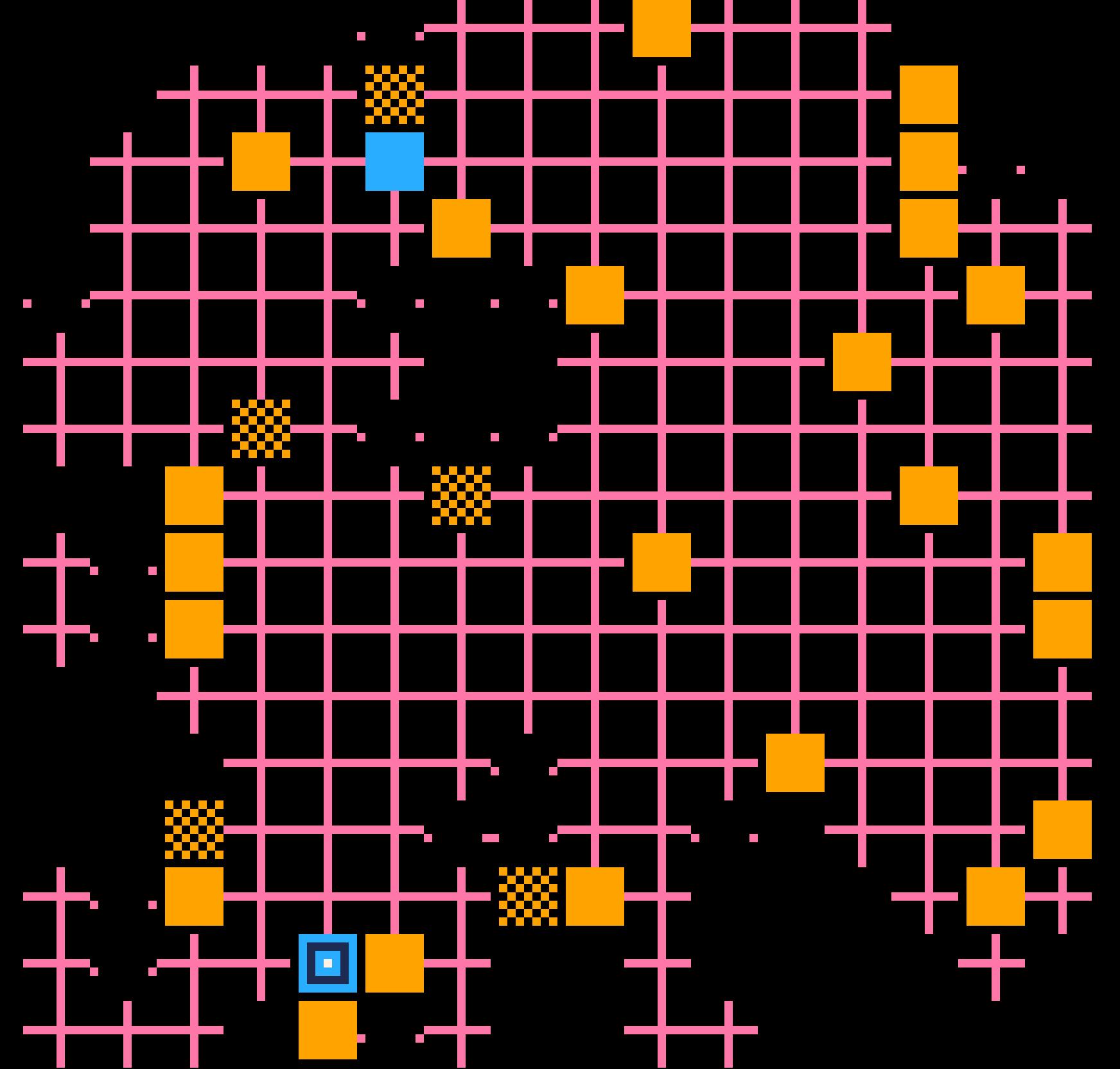
My major breakthrough was removing the first column and last row from the sprites. Now my sprites were 7px by 7px with a buffer to the left and bottom. And each sprite has a 1px center and 1px lines of symmetry. Instead of being empty, the default non-blocking tile now contains an intersection of horizontal and vertical lines, meaning the walls and floor feel rhythmically different. There's a Tron vibe, there's an early arcade vibe, the grid is a literal Matrix. The blocking tiles can go back to being solid blocks and they all have this inbuilt buffer that defines a second, implicit grid, perfectly offset from the first. It just feels right.
I also realised that my "trap" tiles — passive threats — could be holes where the grid is broken. This is both communicative and graphically elegant. I've not decided yet whether these will be interactive for the player, or just psychologically off-putting.
First handheld test
After updating the graphical vocabulary I made a few new levels to make a pre-alpha playthrough worthwhile and transferred the cart to my RG CubeXX. I was worried it might look small when scaled down, but no, I'm thrilled with how it looks and plays. From Atari 2600 to… NES maybe?
Inevitably, each step forward throws up more issues for the backlog. Targeting the handheld format, which has always been the intent, has created some development priorities:
- bug where D-pad diagonals teleport the player into walls
- level reset command required in case of player soft-lock
- a death/restart mechanism if the player moves off-screen
- an end-of-game mechanism to restart after the last level
Next steps
To get the degree of freedom and flexibility I want with player animations, I need to bite the bullet and refactor the movement and player turn functions. I might as well lock down the inputs to up, down, left, right while I'm at it. A level reset function can be triggered by death or a button press, so that seems worth doing as well.
- refactor movement code
- limit direction inputs
- restart level function
- basic endgame function
END